Your CPAP app said last night was fine. You woke up exhausted anyway.
CPAPView opens the SD card from your ResMed machine and draws every breath it recorded — flow rate, mask pressure, leak, and every apnea it flagged. The kind of analysis OSCAR does, with nothing to install.
Free. Your files are read in your browser — nothing is uploaded unless you ask. Chrome or Edge on desktop.
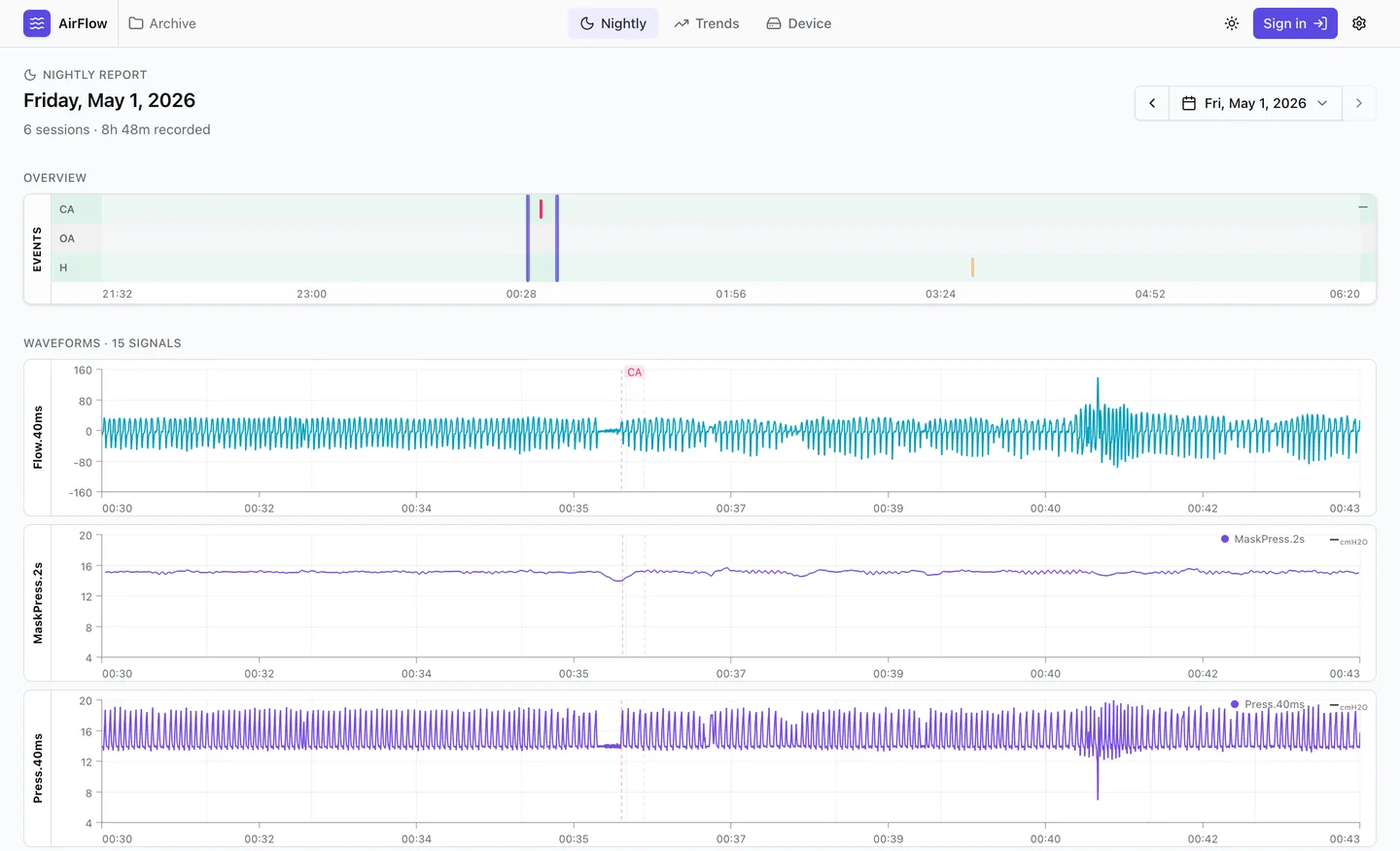
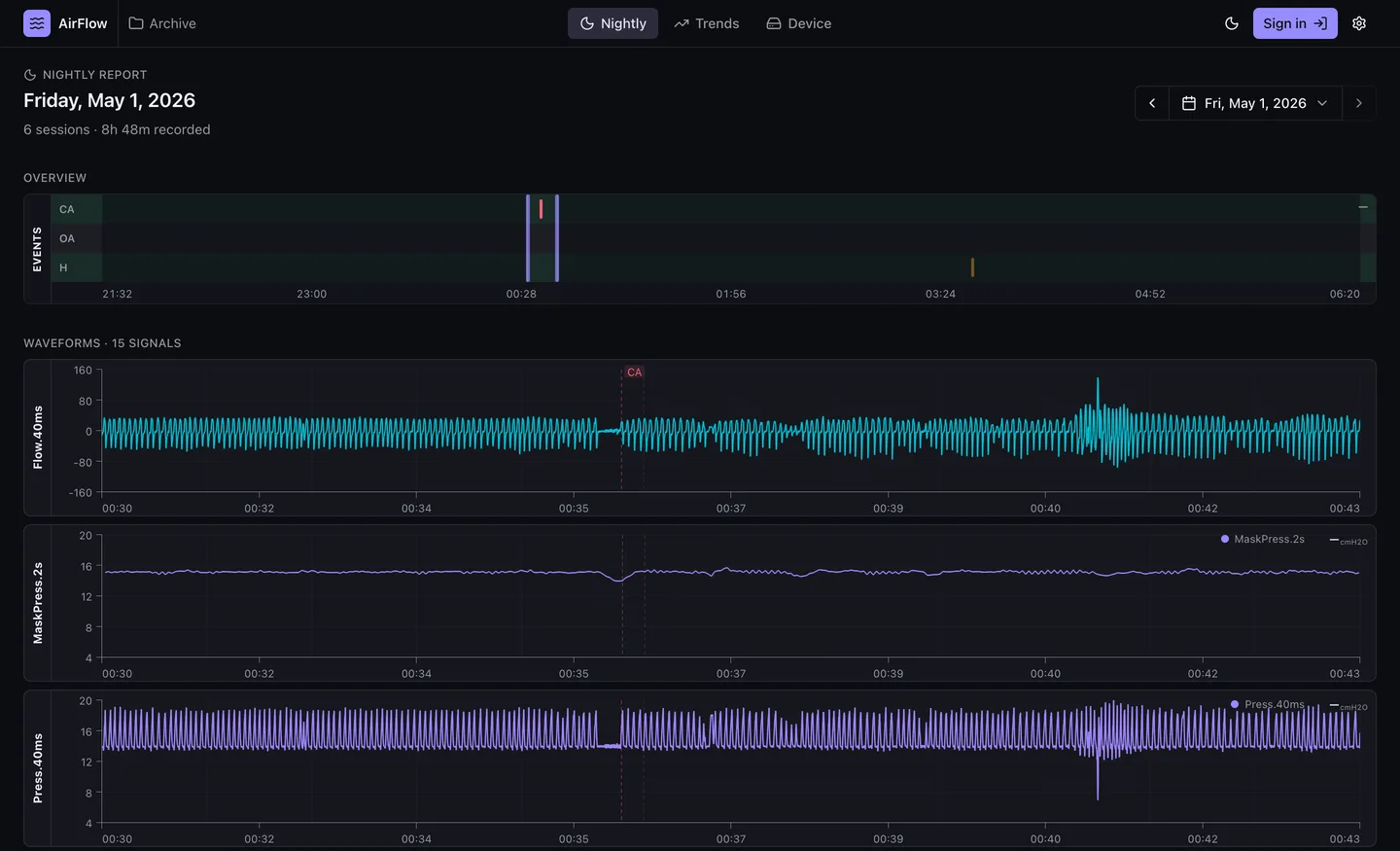
A real night in CPAPView — zoomed to a clear-airway event, breath by breath.
How it works
About thirty seconds, start to finish, and you don't need an account.
-
Pop out the SD card
Your machine writes the whole night to the card — a
DATALOGfolder full of EDF files, at up to 25 samples a second. -
Open the folder in your browser
One click, and no import step. CPAPView reads the files where they sit and never copies them anywhere.
-
Scroll through your night
Drag anywhere to zoom, from an eight-hour overview down to a single breath, with each flagged event marked where it happened.
New to this? Here is what an apnea actually looks like
Your app reports a number — AHI, the count of breathing events per hour. Here is one of those events on a real night, thirteen minutes of airflow, second by second.


Each spike is one breath in and out, roughly one every four seconds. Between the dashed lines airflow drops to almost nothing — your machine labelled that CA, a clear-airway apnea, where nothing was blocking your throat. Breathing then restarts larger and more ragged than before, which is usually the part that wakes you.
Which kind you are having matters. Obstructive events, clear-airway events and hypopneas have different causes and different fixes, and your machine already tells them apart. Most apps just add them up into one number.
Coming from OSCAR?
Same kind of analysis, without the desktop install — you point it at the card and it opens. Here is the honest comparison, including where OSCAR still wins.
| CPAPView | OSCAR | |
|---|---|---|
| Getting started | Open a folder | Install, then import |
| A panel per signal — fifteen on the night above | Yes | Yes |
| Event overview with CA, OA and hypopnea rows | Yes | Yes |
| Zoom from a whole night down to one breath | Yes | Yes |
| Crosshairs synced across every panel | Yes | Yes |
| Multi-night trends and statistics | Not yet | Yes |
| Machines other than ResMed | No | Yes |
Trends is what we are building next. Today CPAPView is a single-night tool, and we would rather say so here than let you find out after you have plugged in the card.
Your data never leaves your browser, and you can check that yourself
Open DevTools, watch the Network tab, and load a night. Your data never appears there. CPAPView parses your files inside your browser, so you don't have to take our word for any of this.
The one exception
When a folder fails to parse, you can sign in and send it to us so we can fix the bug. It takes an explicit consent step, it never happens on its own, and you can delete the upload afterwards from settings.
Sharing, when you want it
Getting help with your therapy often means showing your data to someone — a clinician, a forum, a friend who has been through it. That should be your decision, not a condition of using the tool. An optional account for keeping nights across devices is planned, and it will stay optional.
Before you plug in the card
- Supported machines
-
ResMed machines that write the standard SD-card layout — a
DATALOGfolder of EDF files, which is what an AirSense writes by default. Other brands are not supported yet. - What you need
- The card itself, or a copy of its contents, and a desktop browser with WebGPU — a current Chrome or Edge. Phones can't open a folder this way yet.
Your machine recorded last night. Go and look at it.
Free, no account, nothing to install.